
Configuration
Model configuration
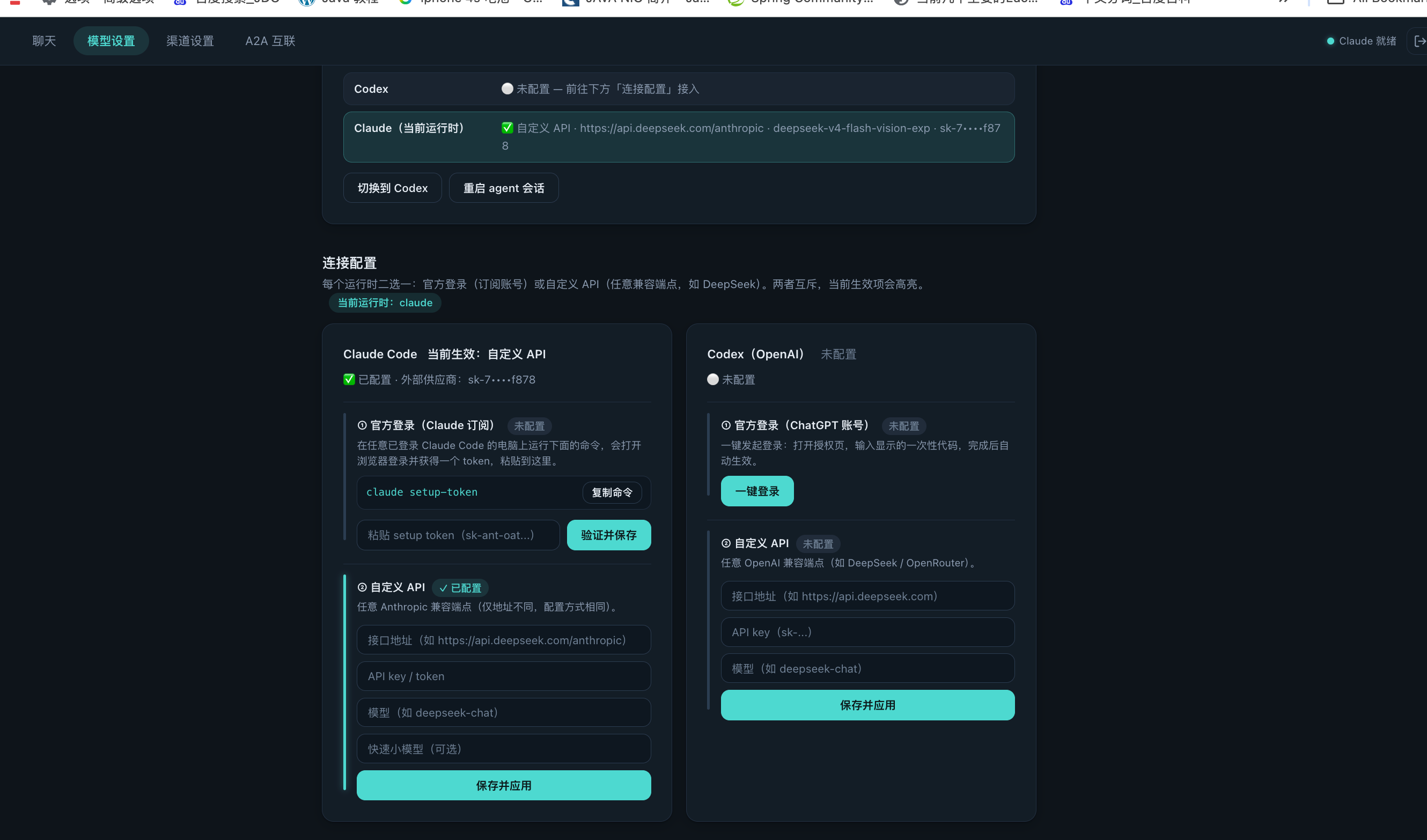
Choose the intelligent employee runtime from Web Console → Model settings. Baize supports both official sign-in and custom API connections; Claude and Codex can be configured independently, with one selected as the active runtime.
- Open Web Console → Model settings.
- Choose Claude or Codex.
- Sign in with the official account, or enter a compatible endpoint, API key and model name.
- Save and apply, then confirm that the top status reads “Running”.
Restart the agent after activating a third-party key: after configuring a custom API (third-party key) and activating it, click Restart agent session once in the Web Console so the agent relaunches with the new config (wait a few seconds — the daemon brings it back up automatically). If the old session was stuck on a login screen, the restart force-ends it and starts a fresh session.
Official credentials and custom API settings are independent. Switching runtimes does not remove the other configuration.
Persistent configuration lives in ~/baize/.baize/config.json:
{
  "npmRegistry": "https://registry.npmmirror.com",
  "npmToken": "private-registry-token",
  "channels": {
    "my-bot": { "title": "Internal bot", "type": "communication", "repo": "acme/my-bot" }
  }
}
npm registry precedence
Private registries requiring a token use BAIZE_NPM_TOKEN (env) or "npmToken" (config) — sent as Authorization: Bearer on metadata/search/ tarball requests (.npmrc is not read).
Precedence, highest first:
--registry <url>            command-scoped, this command only, not persisted
BAIZE_NPM_REGISTRY          process-level (env)
config.json npmRegistry     persistent (npmmirror / private source)
https://registry.npmjs.org  default (global)
Channel credentials
Channel credentials live in ~/baize/.env as FEISHU_APP_ID, FEISHU_APP_SECRET, WECOM_BOT_ID, WECOM_BOT_SECRET — set them from the web console, where values are validated before saving.
A2A configuration
A2A is configured under a2a in config.json (or BAIZE_A2A_* env vars). enabled: false is the default — a fully standalone instance:
{
  "a2a": {
    "enabled": false,
    "admin_url": "",
    "agent_id": "",
    "advertise_url": "",
    "authz": { "mode": "open", "allow": [], "block": [] }
  }
}
enabled: false— no A2A endpoint, worker, registration or heartbeat; zero A2A trafficenabled: true— start the A2A service → self-register → admin approval → JWT → heartbeat (30s) → discoverable and callableauthz.mode—open(default, with ablocklist) orallowlist; rejected calls return 403 and are audited
See A2A Collaboration for the full protocol and lifecycle.