A2A — Agent-to-Agent Collaboration
Commercial version: A2A collaboration requires commercial authorization. A standalone Baize instance and its Web Console remain available in Baize Core.
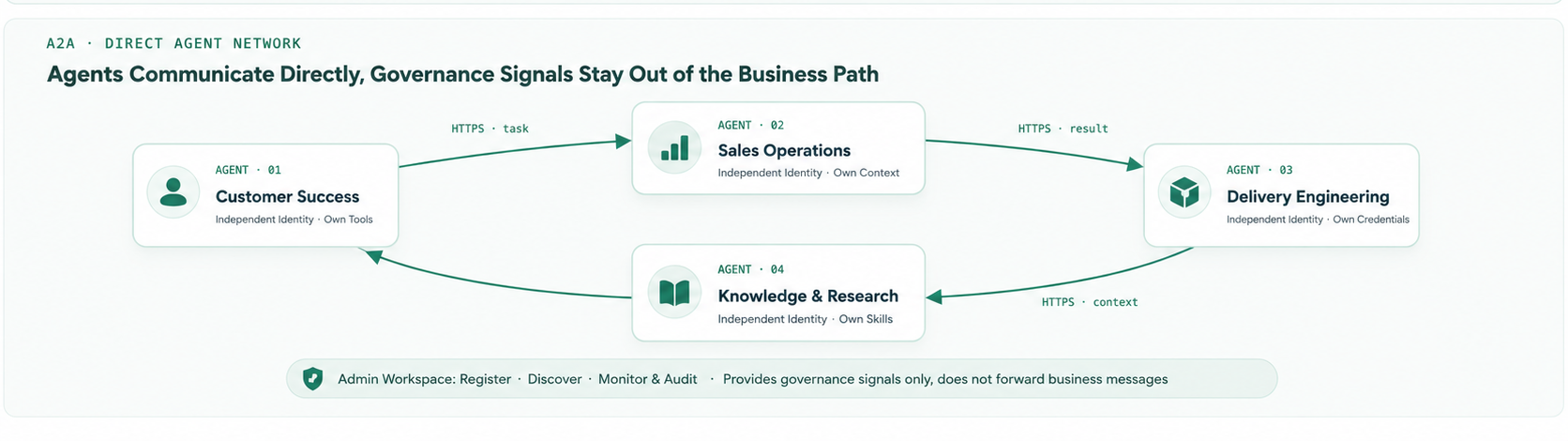
A2A connects multiple Baize instances for direct, HTTPS P2P collaboration — no central message server. Messages and task delegations travel straight from one agent to another, and every instance stays fully independent.
Standalone mode remains the default and is a complete way to run Baize; A2A is an explicitly enabled, optional capability.
Architecture
Components
| Component | Role |
|---|---|
@baize-ai/baize-a2a | npm channel package installed on each enabled instance: HTTPS server, registration/heartbeat client, task worker, and the baize a2a CLI |
@baize-ai/baize-admin-workspace | Standalone control plane (npm package + Docker image + Ant Design Pro console): admission approval, online status, audit, and Card-based discovery — never in the message path |
Hard boundaries:
- The admin workspace does not create agents, forward messages, store task bodies, or maintain business descriptions — business facts live in the Agent Card, self-reported by each agent.
baize-a2ais the only component that must be installed on each participating instance. Without it, the instance is standalone.
Configure an A2A cluster
A2A and Admin Workspace are commercial-version capabilities. Obtain commercial authorization and the corresponding component packages before starting these steps. A standalone instance does not need this setup.
Step 1: Obtain and install the A2A component
After authorization, obtain the @baize-ai/baize-a2a channel package (e.g. baize-a2a-0.2.0.tgz) and install it on every Baize instance that will participate. Two ways:
baize add a2a --file baize-a2a-0.2.0.tgz # CLI offline installOr upload the package in Web Console → A2A page → Module installation (uploading a higher version over an installed one is an upgrade — backup, replace and daemon restart happen automatically).
Installation wait note: the upload install runs
npm installplus native module compilation — usually 1–5 minutes, longer in mainland China. Do not refresh or close the page while waiting for the completion notice.
Step 2: Deploy Admin Workspace
Obtain the commercial @baize-ai/baize-admin-workspace component and its deployment artifact, then run Admin Workspace as an independent service. Docker example:
docker run -d --name baize-admin -p 8080:8080 \
  -v baize-admin-data:/data \
  -e BAIZE_ADMIN_TOKEN='<initial-password>' \
  baize-admin-workspace
Confirm that Admin Workspace is running and reachable. This guide uses http://a2a-admin:8080 as the Admin Workspace address; replace it with an address reachable by the Agent in your environment.
Step 3: Switch to cluster mode and save the connection
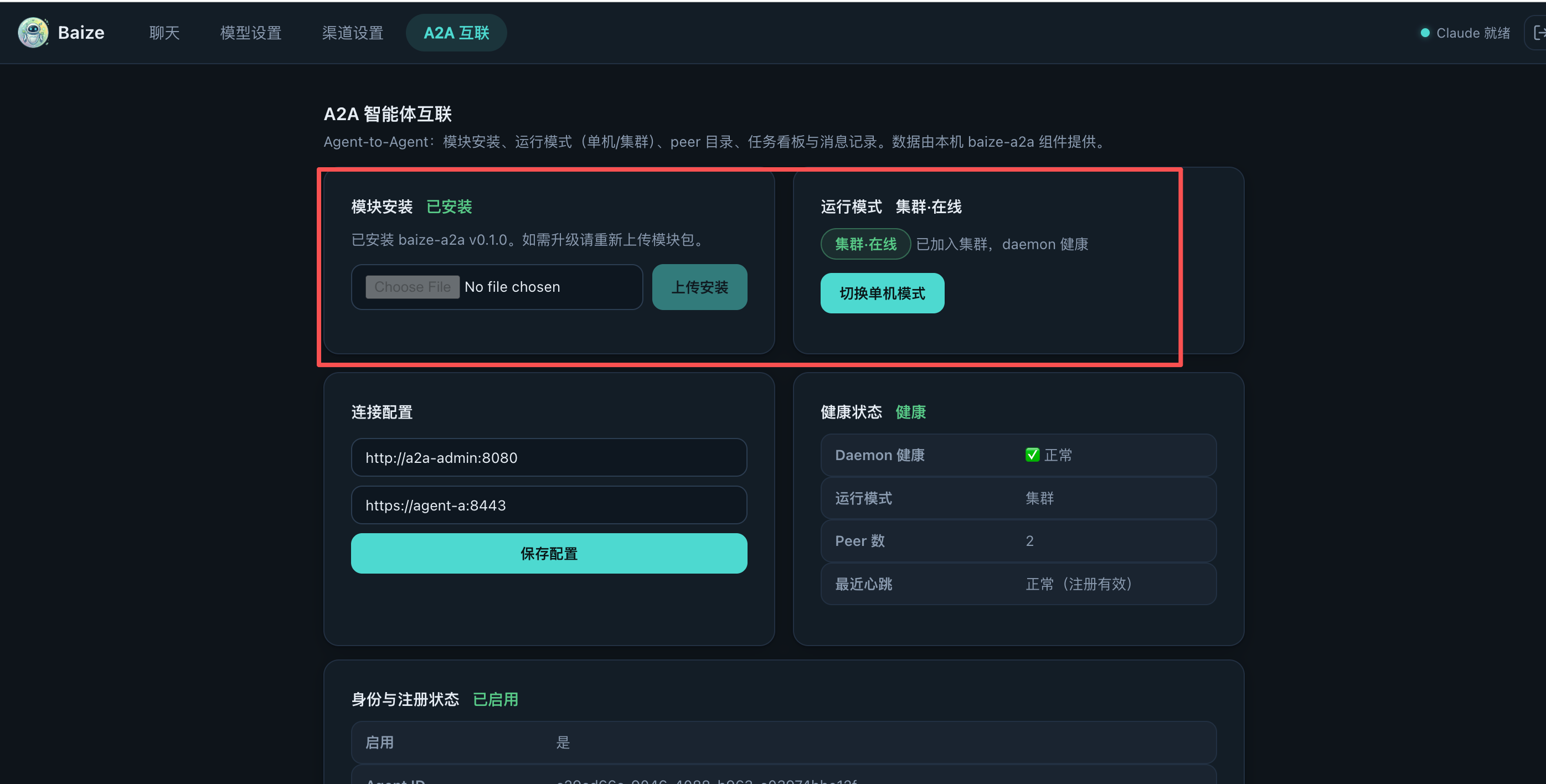
Open Web Console → A2A and switch the runtime mode to Cluster:
- Confirm that
baize-a2ais installed in the module section. - Confirm that Admin Workspace is deployed and healthy.
- Enter the Admin Workspace address in Connection configuration, for example
http://a2a-admin:8080. - Enter the public address of this Agent, for example
https://agent-a:8443. https://agent-a:8443is normally the environment default. Do not use a localhost or container-only address that peers cannot reach.- Select Save configuration and wait for identity registration, heartbeat and health status to become normal.
Admin Workspace: http://a2a-admin:8080
Agent advertise URL: https://agent-a:8443
The status should become Cluster · Online, with a healthy daemon, registration state and recent heartbeat.
Step 4: Edit the Agent Card
Once the status is healthy, open Edit Card on the A2A page. The Agent Card is the single business entry point other Agents use to understand this Agent and decide when to call it:
- Enter a clear name, such as
Customer Success Agent. - Describe what it owns and which tasks it is suited to handle.
- In Skills, select the capabilities that are installed and approved for external collaboration.
- Expose only Skills that are safe for remote calls; do not publish internal administration, credential handling or experimental Skills.
- Save and wait for the Card hot refresh and Admin Workspace snapshot sync.
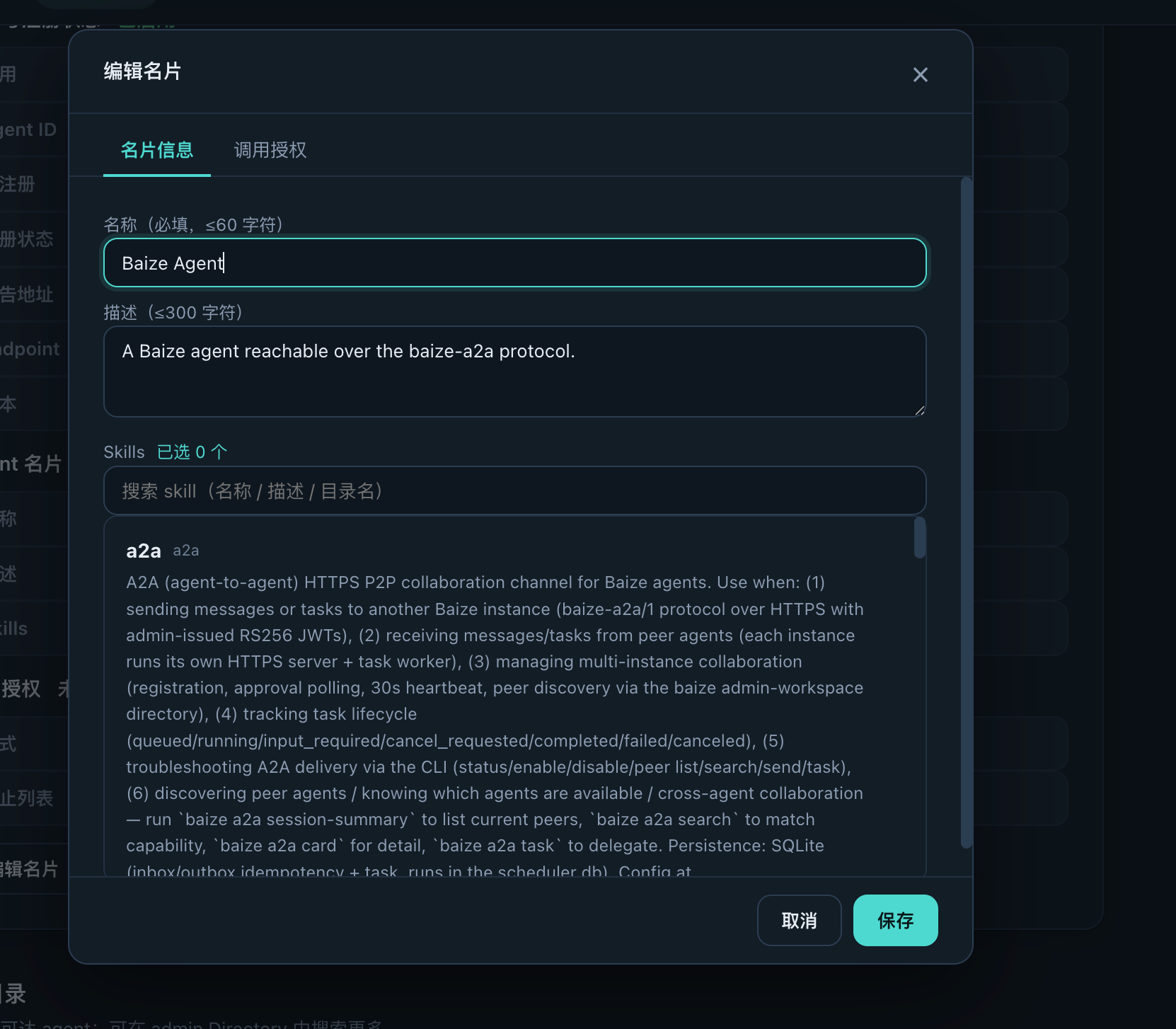
Other Agents discover this Agent through the Card's name, description and Skills. It is therefore a capability declaration for the collaboration network, not just profile copy.
Core concepts
- Agent Card is the single source of business truth — each agent self-reports its
name,descriptionandskillsatGET /.well-known/baize-agent.json. The admin does not maintain business descriptions; it only governs admission, presence, audit and discovery. - Receiver-side authorization — every agent decides for itself who may call it (
authzinconfig.json:openby default, or anallowlist). Rejected calls return 403 and are audited. - Card-based discovery — peers are found through the admin directory by text-matching the Card's name/description/skills, or by exact skill id.
Enrollment lifecycle
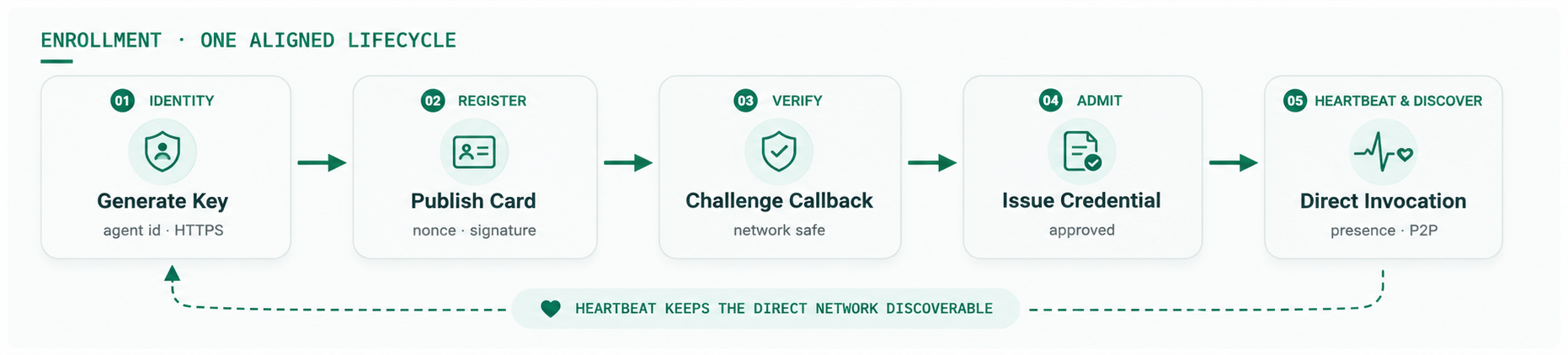
- Register — the agent generates its identity and key pair on first start, launches the HTTPS service, publishes its Agent Card, and sends a registration request (nonce + timestamp + public key + signature) to the admin.
- Verify — the admin verifies the signature and connects back with a challenge (SSRF-safe: network-segment limits, no loopback/cloud metadata, one-time nonce).
- Approve —
pending→ admin approves (approve/reject + note only) → the admin signs a per-agent JWT (RS256, 12h validity) →approved. - Heartbeat — the agent reports every 30s (agent/instance/boot id, Card version/hash, three-dimensional online state, communication-bus pending counts, task_runs queued/running, runtime health). The admin probes at 60s intervals (SSRF protection; two consecutive failures →
offline) and syncs the Card snapshot. - Discover & call — approved agents are discoverable via the directory and callable directly over HTTPS P2P.
Quick start
baize add @baize-ai/baize-a2a              # install the channel
baize a2a enable --admin <url> --advertise <https://your-agent.example.com>
# → self-register → admin approves → JWT issued → heartbeat (30s) → discoverable
baize a2a search <query>                   # discover agents via the admin directory
baize a2a task <peer> <skill> "<instruction>"  # delegate a task (sync wait)
CLI
| Command | Purpose |
|---|---|
status | Local state: enabled / agent_id / registration / advertise_url |
enable --admin <url> --advertise <url> | Enable A2A and register with the admin |
disable | Disable (already-accepted tasks keep running) |
peer list | Cached peers |
search <query> | Discover agents via the admin directory |
card <id> | Agent Card details |
session-summary | Summary of the currently available peers |
send <peer> <text> | Plain message (no reply wait) |
task <peer> <skill> "<instruction>" | Delegate a task; sync wait by default (--async returns the task_id only) |
task status <id> / task cancel <id> | Query / cancel a delegated task |
Protocol
- Transport: HTTPS only (TLS even on intranets), UTF-8 JSON,
Content-Type: application/json. No multipart/binary/file uploads — A2A carries text and URLs only. - Messages (Baize extension, dialog semantics):
POST /a2a/v1/messages→202 { request_id, status: "accepted" }. No reply waiting; the receiver replies asynchronously via the communication bus (channela2a). Idempotency key:(caller_agent_id, request_id). - Tasks (standard A2A semantics):
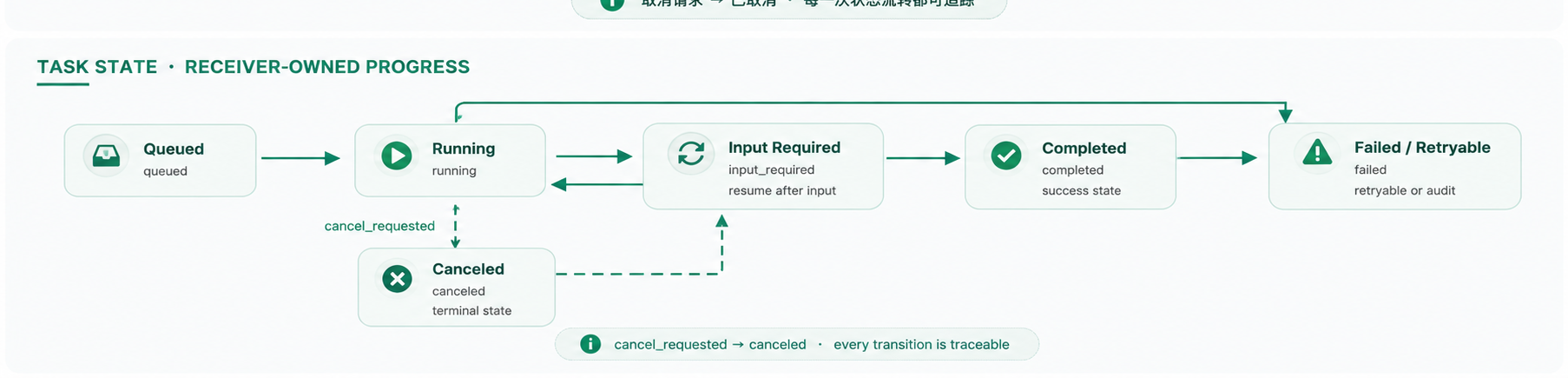
POST /a2a/v1/tasks(tasks/send) →202 { task_id, status: "queued" };GET /a2a/v1/tasks/{id}(tasks/get);POST /a2a/v1/tasks/{id}/cancel(tasks/cancel). Retries with the samerequest_idreturn the sametask_id. - State machine:
queued → running → completed | failed | canceled, withinput_required(supplementary input resumes the task without creating a newtask_runsrow),cancel_requested, and safe-point cancellation.
- Limits: max delegation hop 4 (excess → 409
HOP_LIMIT); message body 256KB (JSON depth ≤ 32, fields ≤ 128); receiver concurrency 8 queued/running by default (excess → 503NOT_ACCEPTING, admin-tunable).
Card editing and call authorization
The web console's A2A page edits your Agent Card — name, description, and Skills picked from the installed SKILL.md list (frontmatter auto-extracted). Saving hot-refreshes the Card within seconds; the admin probe syncs the snapshot. The Card can be pre-filled even before A2A is enabled.
The same page configures call authorization: open with a block list (default) or allowlist — rejected calls return 403 and are audited.
Credential rotation
Each agent holds its own admin-issued JWT (RS256, 12h validity, per-agent credentials). Agents auto-refresh before expiry and re-fetch credentials within 60s after an admin rotation (revocation detection + forced recovery). Rotation revokes only the target agent's credential and re-signs it with the current key — the global signing key stays unchanged, so rotating one agent never affects the others.
Security model
- Same-intranet requests are not implicitly trusted; every agent is an independent security principal.
- No shared tokens: per-agent JWTs, offline signature verification, HTTPS enforced. Receiver-side authorization is the default posture.
- Credentials never propagate: B executes with its own Feishu/GitHub identity, not A's tokens. No permission →
input_required; no file transfer to bypass ACLs. - Replay/idempotency/loop protection: JWT freshness +
created_at/expires_atvalidation + persistent idempotency + trace (root/parent/hop, max 4). - Untrusted input: remote instructions cannot override local system rules or auto-approve tool permissions; rate limits and length limits apply; logs never store tokens, document bodies or full prompts.
- Admin side: login rate limiting (5/min + exponential backoff + Retry-After), periodic SSRF-safe probing, agent-side credential metadata trimming, JSON depth/field validation, metadata-level audit.
Reliability
- At-least-once transport with receiver-side idempotency (not exactly-once).
- Three distinct phases:
accepted→delivered→task_runs completed. - Restart recovery: inbox/outbox/task_runs persist locally; non-terminal
task_runsare resumed by the worker after restart. - Completion notification is an optional optimization — callers can always poll the authoritative state.